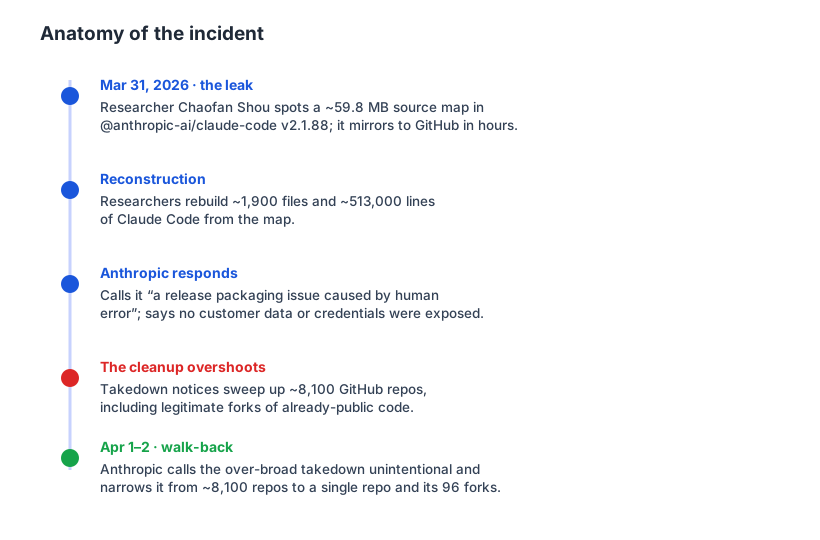
On March 31, 2026, Anthropic did something no company wants to do: it published its own source code to the world — by accident. Not through a breach, not through a rogue insider, but through a single file that slipped into a public npm package. After a researcher spotted it, the un-minified source — roughly 1,900 files and 513,000 lines of Claude Code, the very tool many of us use to write software — was mirrored to GitHub within hours. Here is what happened, why it happened, and the one lesson every developer should take from it.
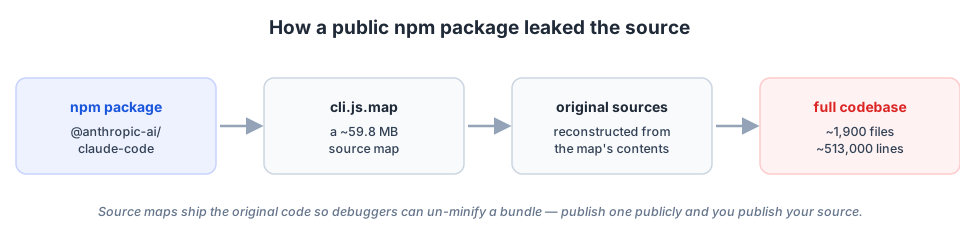
The one-line root cause: a source map
Modern JavaScript tools bundle and minify your code into a single, unreadable file for shipping. To make that file debuggable,
they also emit a source map — a companion .map file that contains (or points back to) the
original source so a browser or debugger can un-minify what it sees. That is wonderful in development and a disaster in
a public package: a source map is your source code.
Anthropic ships Claude Code as an npm package built with Bun, which emits full source maps by default. A
roughly 59.8 MB cli.js.map made it into published version 2.1.88 because
*.map was never excluded from what npm packs (via .npmignore or the files field in
package.json). Anyone who ran npm install @anthropic-ai/claude-code could reconstruct the original
code. Anthropic described it as “a release packaging issue caused by human error, not a security breach,”
adding that no sensitive customer data or credentials were involved or exposed — which, as leaks go, is
the good kind of bad.
What was actually inside
The most interesting part was not the code quality — it was the roadmap peek. Analyses of the leaked source turned up dozens of hidden feature flags (reportedly around 44) and internal codenames for things that had not shipped:
- KAIROS — a persistent, autonomous background mode: an agent that keeps working on its own rather than living only inside a single interactive session.
- ULTRAPLAN — a delegated, longer-horizon planning mode.
- BUDDY — the surprise entry: a Tamagotchi-style desktop pet, apparently with 18 species.
- Model and product codenames, including Tengu (Claude Code itself), Fennec (Opus 4.6), and unreleased names like Capybara and Numbat.
If an autonomous agent that keeps working on its own (KAIROS) plus delegated planning (ULTRAPLAN) sounds familiar, it should: it is roughly the shape of the self-hosted, always-on agent setups people are already wiring up today. The leak did not expose secrets so much as it confirmed where coding agents are heading. (These come from third-party analyses of the dump, not an official roadmap — treat the details as directional, not promises.)
The cleanup made it worse before it got better
The response is where an embarrassing slip turned into a story. Anthropic issued takedown notices to scrub the leaked material, but the net was cast far too wide: the notices disabled a fork network of around 8,100 GitHub repositories, including legitimate forks of code that was already public. Claude Code lead Boris Cherny acknowledged it publicly — “this was not intentional, we’ve been working with GitHub to fix it” — and the action was narrowed from ~8,100 repos to a single repository and its 96 forks. Still, a lot of developers watched their repos vanish over a mistake that was not theirs.
The lesson: check your own packages
It is easy to file this under “big company, big mistake” and move on. But the exact same footgun is loaded in most of our build pipelines. If you publish an npm package, ship a desktop app, or deploy a web frontend, ask yourself whether your source maps are going out with it. A few concrete habits:
- Decide who your source maps are for. Keep them for internal error reporting (upload to Sentry and delete), but do not pack them into a public artifact unless you mean to.
- Use an allow-list, not a deny-list. In
package.json, set thefilesfield to the exact things you intend to publish. It is far safer than trying to remember every*.mapin.npmignore. - Inspect the tarball before you publish. Run
npm pack --dry-run(ornpm publish --dry-run) and actually read the file list. The leak would have been a one-line diff to catch. - Turn off production source maps by default. Most bundlers make this a single config flag; opt in deliberately rather than shipping them because the tool did.
- Scope your takedowns narrowly. If you ever do have to clean up, target specific URLs — the collateral damage from a wide net can outlast the original mistake.
Wrap-up
The Claude Code leak was low-severity by the numbers — no secrets, no customer data, and much of the tool is
source-available anyway. Its real payload was a reminder. The most powerful AI lab on the planet lost control of its source to a
default setting and a missing line in a config file. The same default is sitting in your build right now. Go run
npm pack --dry-run and read the list.
Sources: reporting from TechCrunch, VentureBeat, The Hacker News and CNBC; technical write-ups from NodeSource, InfoQ and
Layer5; and community analyses of the leaked source. Figures (~59.8 MB cli.js.map, ~1,900 files / ~513,000 lines,
~8,100 repos) reflect the most-cited numbers as of early April 2026; unreleased feature and codename details come from
third-party analysis and may change.
Comments
Post a Comment