
By the end of the 1970s, Apple had a hit computer, a landmark IPO, and a problem it could not code its way out of: nobody actually knew how to talk to a computer. You typed cryptic commands at a blinking prompt, memorized syntax, and hoped. The machine sat there, patient and useless, until you spoke its language. The great leap of the early 1980s was not a faster chip. It was teaching the computer to speak ours — and the ideas that made that possible were sitting, largely unused, in a research lab a few miles from Apple’s door.
The lab that invented the future and forgot to sell it
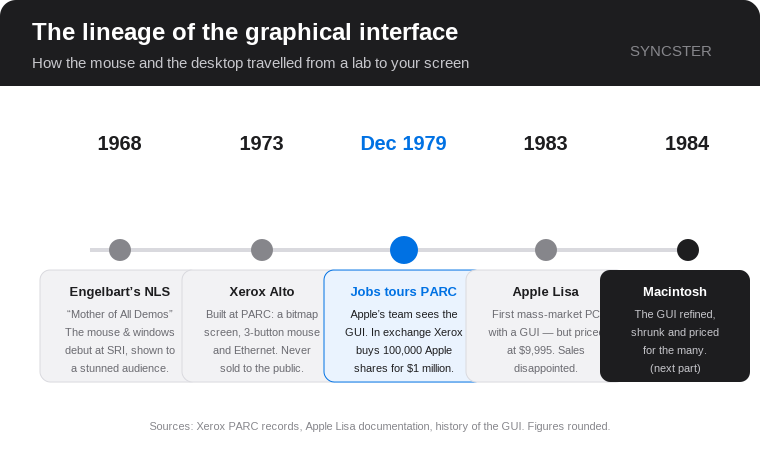
Xerox — the copier company — had opened the Palo Alto Research Center, or PARC, in 1970. Its mandate was loose and its budget generous, and the result was one of the most astonishing runs of invention in the history of technology. In 1973, PARC engineers finished the Xerox Alto: a machine with a crisp bitmapped display of 606×808 pixels, a three-button mouse, on-screen windows, and Ethernet networking to tie machines together. It could produce documents that looked on screen the way they would look on paper — what we now call WYSIWYG.
None of this appeared from nowhere. The mouse and the multi-window screen traced back to Douglas Engelbart’s work at SRI in the 1960s, crowned by his 1968 public demonstration in San Francisco that history now calls “The Mother of All Demos.” Several of the people who built that future then walked over to PARC and kept building. The Alto was the payoff: roughly 2,000 of the Alto II were eventually made, and they were the everyday workstations of PARC researchers.
And yet Xerox, a copier company at heart, never turned the Alto into a product people could buy. The machine cost a fortune to build, and the executives who ran the company simply did not grasp what they were holding. The future had been invented. It was just waiting for someone to notice.
December 1979: the most productive field trip in tech history
In late 1979 Steve Jobs cut a deal. Xerox’s venture arm wanted to invest in the hot young company before its IPO; Apple agreed to let Xerox buy 100,000 shares for $1 million — on the condition that Apple’s engineers get a good look at what PARC was working on. In December 1979, Jobs led a group of his people through the lab’s doors.
What happened next has hardened into legend, and the core of it is true. Jobs was shown three genuinely revolutionary things that day: object-oriented programming, a networked office of computers, and the graphical user interface. By his own later admission, the GUI so completely captivated him that he barely registered the other two. Here was a screen where you could point at things, drag them, open them, throw them away — a computer you operated the way you operate the physical world. Larry Tesler, one of the PARC researchers giving the demo, watched Jobs and the Apple team fire off questions and realized these visitors understood the work better than his own management did. Tesler would soon join Apple.
Jobs later put it with characteristic bluntness: Xerox could have owned the entire computer industry. Instead, its leadership were “copier-heads” who had no idea what they were sitting on. It is one of the most expensive failures of imagination in business history.
Not stealing — translating
The popular version of this story is that Apple simply stole the GUI from Xerox. The reality is more interesting, and more to Apple’s credit. What PARC had was a set of brilliant ideas that were nowhere near ready for ordinary people. The Alto’s mouse had three buttons and cost around $300; PARC’s interface still leaned on typed commands in places; and the whole system carried a price that only a research lab could love.
Apple did the unglamorous, decisive work of turning a demo into a product. Jobs pushed his team, working with the design firm that would later become IDEO, to build a mouse that was reliable, that could roll on a desk or a pair of jeans, and that could be manufactured for a target of roughly fifteen dollars instead of three hundred. Apple’s engineers made the radical choice of a single button to keep it simple. They invented behaviors PARC had never shipped — the pull-down menu that stays put, the drag-and-drop of a file into a folder, the double-click, overlapping windows you could reorder by hand, the trash can you drag documents into to delete them.
All of this poured first into the Apple Lisa, unveiled on January 19, 1983. The Lisa was a marvel: the first mass-market computer operable entirely through a graphical interface, with memory protection and a pre-loaded office suite. It was also a commercial disappointment, hobbled by a staggering base price of $9,995, unreliable “Twiggy” floppy drives, and sluggish performance. By most accounts it sold only around 10,000 units in its early life and cost Apple well over $100 million to develop. The idea was right. The execution and the price were not.
But the Lisa was never really the point. It was a rehearsal. Everything Apple learned about making the graphical interface fast, cheap, and human was about to be poured into a smaller, friendlier, far more affordable machine — one Jobs intended to put in front of everyone.
Next in the series: a beige box, a $1.5 million Super Bowl ad, and the computer that made the mouse a household object — the birth of the Macintosh.
Comments
Post a Comment