The Mac Mini has quietly become one of the most interesting home-server boxes you can buy. It’s tiny, nearly silent, sips power, and Apple Silicon punches far above its weight. But is it actually the right machine to run your services on — or are you paying an Apple tax for a job a $400 mini PC does better? Let’s put it head-to-head.
Why a Mac Mini makes a surprisingly good server
Three things make Apple Silicon compelling as an always-on machine:
- Performance per watt. This is the headline. An M4 Mini idles at just a few watts and rarely pushes past ~35W under load, while delivering multicore performance that embarrasses machines drawing twice the power.
- Silence. Under typical server loads the fan is inaudible. If your “server” lives in a living room or bedroom, this matters more than any benchmark.
- Footprint. It’s the size of a coaster and runs cool, so it tucks anywhere.
The honest catch
It’s not all upside:
- macOS isn’t a server OS. You can run Docker, databases, web apps and reverse proxies, but you’ll fight macOS conventions (headless login, automatic updates, launchd instead of systemd). Many people run Linux in a VM on top, or dual-track with Asahi Linux (which is impressive but still maturing on the newest chips).
- Storage & RAM aren’t upgradeable. Buy the RAM/SSD you’ll need up front — and Apple’s storage upgrades are pricey. External USB/Thunderbolt storage is the usual workaround.
- No ECC memory and limited I/O compared to a “real” server, so it’s a homelab/small-workload machine, not a datacenter node.
The twist: how it stacks up
Here’s where it gets interesting. Put the Mini next to the usual home-server suspects — a Raspberry Pi, an x86 mini PC, and the cloud — and the trade-offs come into focus.
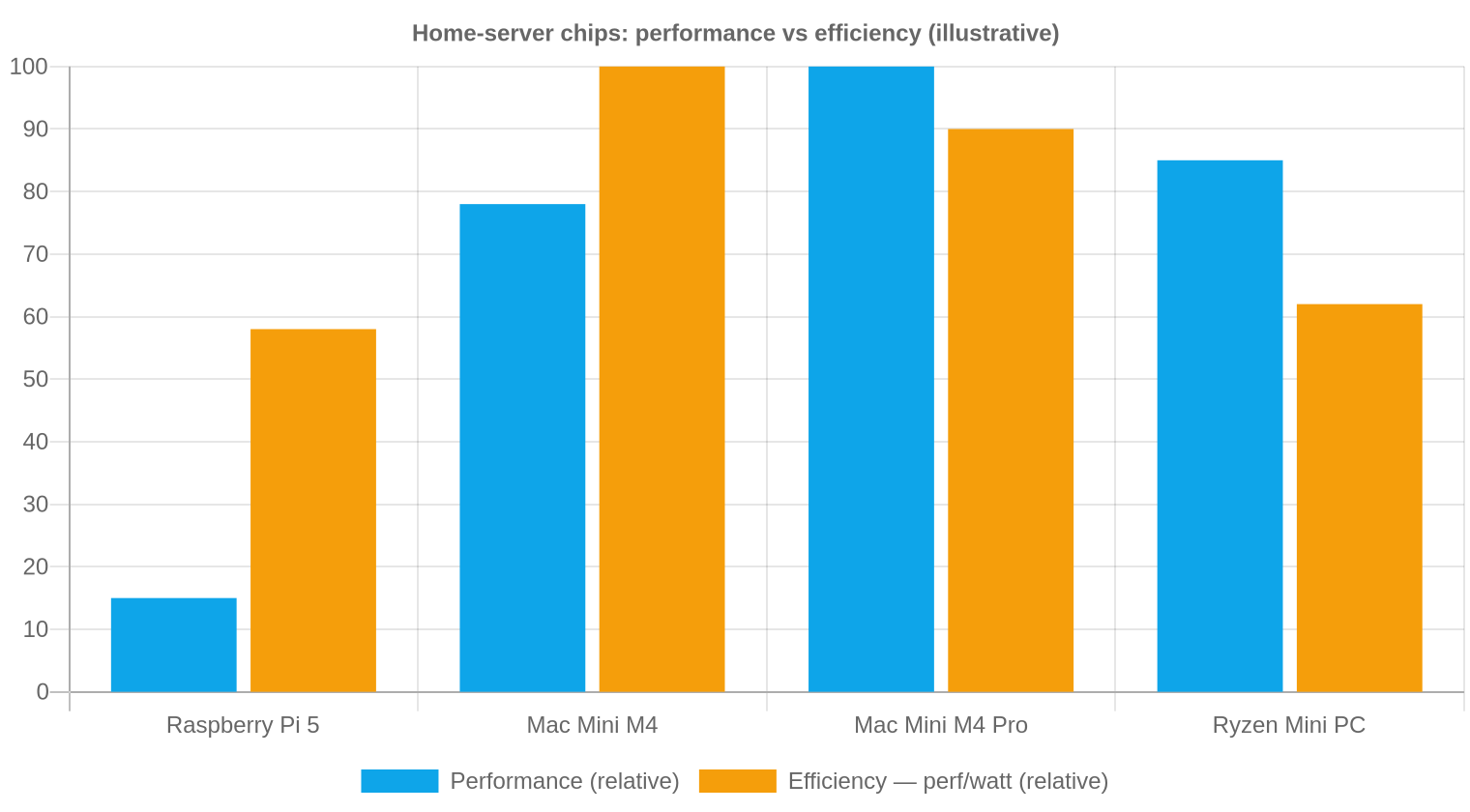
Illustrative, normalized figures — not lab benchmarks. They show the shape of the trade-off, not exact scores.
The chart tells the story: the M4 Pro wins raw performance, but the base M4 is the efficiency champion. A Ryzen mini PC keeps up on performance but burns more watts to do it. The Pi is in a different weight class entirely — wonderful for light, always-on jobs, not for heavy lifting.
The full picture
| Machine | RAM ceiling | Idle / Load power | ~Price | Best for |
|---|---|---|---|---|
| Raspberry Pi 5 | 16 GB | ~3W / ~10W | ~$80 | DNS/ad-block, home automation, learning |
| Mac Mini M4 | 32 GB | ~4W / ~35W | ~$599 | Quiet, powerful all-rounder: containers, media, dev/CI |
| Mac Mini M4 Pro | 64 GB | ~7W / ~65W | ~$1,399 | Heavy workloads, many VMs/containers, local AI |
| Ryzen mini PC | 96 GB | ~10W / ~65W | ~$550 | x86 compatibility, Proxmox, virtualization |
| Cloud VM | scalable | n/a | ~$20–40/mo | Public uptime, scaling, no hardware to babysit |
So which should you actually run?
- Pick a Mac Mini M4 if you want a quiet, low-power box that’s genuinely fast — and you’re OK living within macOS (or running Linux in a VM). It’s the best all-rounder for a home server that doubles as a real computer.
- Pick a Ryzen mini PC if you need native x86, painless Proxmox/virtualization, or cheap upgradeable RAM. Less efficient, more flexible.
- Pick a Raspberry Pi for light, single-purpose, always-on jobs where every watt counts.
- Pick the cloud when the thing needs to be publicly reachable and reliable without you owning the uptime.
Verdict
For a home server, the Mac Mini is no longer a novelty — it’s one of the best performance-per-watt boxes money can buy, and it’s silent. If your workloads fit in its RAM and you can make peace with macOS (or Asahi), the M4 Mini is a fantastic, future-proof little server. Need bare-metal x86 or endless VMs? The mini-PC crowd still has the edge. Either way, the days of a loud, power-hungry tower in the closet are over.
Power and pricing figures are typical ballparks and vary by configuration and workload — check current specs before buying.
Comments
Post a Comment