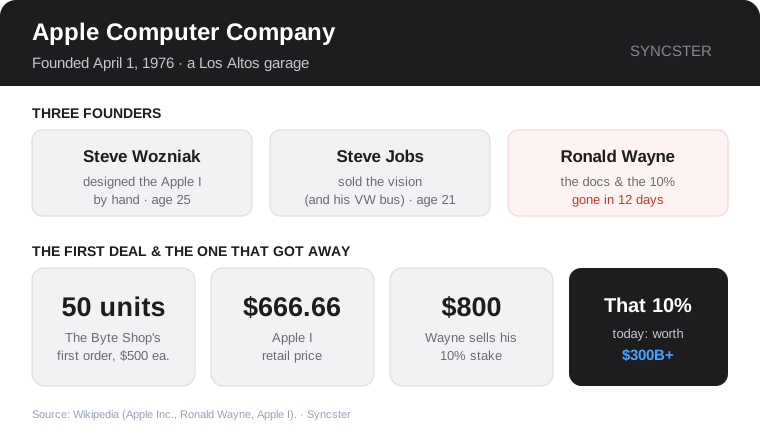
On April 1, 1976, three men signed a partnership agreement to sell a hand-built circuit board to hobbyists. One of them would become the most famous entrepreneur of his generation. One would become a beloved engineering folk hero. And the third would sign away the greatest fortune in business history less than two weeks later — on purpose.
This is where Apple begins: not with a product launch or a grand vision, but with a soldering iron, a sales pitch, and a decision that still makes people wince fifty years later.
The engineer and the salesman
Steve Wozniak — "Woz" — was the genius. A 25-year-old Hewlett-Packard engineer who designed circuits for fun, he had built something remarkable in his spare time: a single-board computer that plugged into a keyboard and a TV and actually worked. In an era when a "computer" meant a fridge-sized machine or a kit of loose parts you assembled yourself, Woz's board was elegant, cheap, and complete. He was happy to give the designs away free to fellow hobbyists at the Homebrew Computer Club.
Steve Jobs, his 21-year-old friend, saw something Woz didn't: a business. Jobs's gift was never engineering — it was conviction, taste, and the ability to make people want things. Why give the board away, he argued, when they could sell it? He convinced Woz to co-found a company, and to raise the startup cash, Jobs sold his Volkswagen bus and Woz sold his prized HP calculator — together scraping up roughly $1,300.
They needed a name. Jobs, just back from working at an orchard commune and partial to fruit diets, suggested "Apple" — friendly, simple, and it would land ahead of Atari in the phone book. Apple Computer Company was born, and the machine became the Apple I.
The forgotten founder
There was a third signature on that founding agreement. Ronald Wayne, a 41-year-old Atari colleague of Jobs's, was brought in as the adult in the room. He drew up the partnership contract, wrote the Apple I manual, and designed the company's very first logo (an ornate drawing of Isaac Newton under a tree). For his administrative role he received a 10% stake in the new company.
Then he got nervous. The partnership made all three men personally liable for its debts — and Wayne, unlike the two broke twenty-somethings, actually had assets a creditor could come after. When Jobs took on a loan to fulfill their first big order, Wayne decided the risk wasn't worth it. On April 12, 1976 — just eleven days in — he relinquished his stake for $800 (and later accepted about $1,500 more to fully bow out). That 10% of Apple would be worth hundreds of billions of dollars today. Wayne has always insisted he made the right call with the information he had; history has been less kind, dubbing him "the man who threw away billions."
The order that made it real
What spooked Wayne was actually Apple's first triumph. Jobs had walked into The Byte Shop, an early personal-computer store, and walked out with an order for 50 Apple I units at about $500 each. It was a huge order for a company that didn't really exist yet — the two Steves and a handful of friends and family assembled the boards by hand, reportedly in the garage of Jobs's parents' home in Los Altos.
The Apple I went on sale at the memorable price of $666.66. It was still just a bare board — no case, no keyboard, no monitor included — and only around 200 were ever made. It was a modest start. But it proved the thesis Jobs had staked the company on: ordinary people, not just engineers, would pay real money for a computer they could actually use.
The Apple I was a hobbyist's machine. The next one would be for everyone — and it would turn this scrappy partnership into the fastest-growing company America had ever seen.
Next time — Part 2: the Apple II arrives in 1977, and a spreadsheet called VisiCalc turns a hobby into an industry.
Comments
Post a Comment