Every empire has an origin myth, and Facebook's begins not with a grand vision of connecting the world, but with a petty, sleep-deprived act of revenge against a database of student photos. On the night of October 28, 2003, a 19-year-old Harvard sophomore named Mark Zuckerberg sat in his Kirkland House dorm room, cracked open a beer, and started building a website that would nearly get him expelled — and would quietly rehearse every instinct that later made him a billionaire.
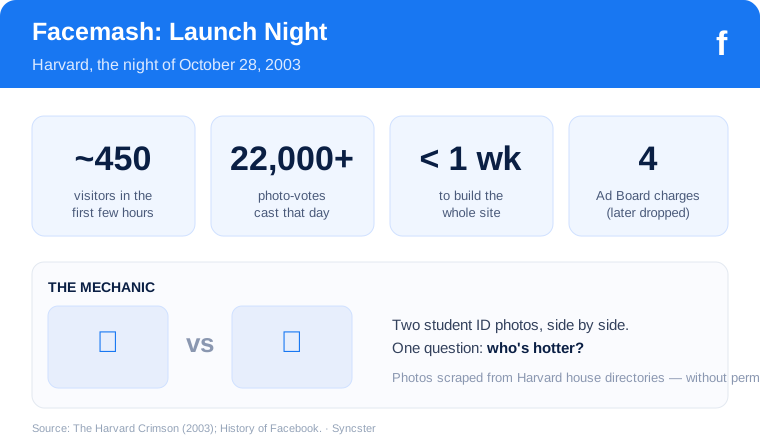
The site was called Facemash. The premise was crude: put two Harvard students' photos side by side and ask visitors a single question — who's hotter? The homepage announced its own thesis with a shrug: “Were we admitted for our looks? No. Will we be judged by them? Yes.”
A night of coding, documented in real time
What made Facemash notable wasn't the idea — “hot or not” sites already existed — but how Zuckerberg got the raw material. Harvard's residential houses each kept an online directory of student ID photos, informally called “facebooks.” There was no single university-wide version, and the individual ones were locked behind house logins. So Zuckerberg simply took them. He wrote later, in a blog he kept open while he worked, about hacking into the house intranets one by one and scraping the images. Some he grabbed with borrowed credentials; others he pulled through gaps in the sites' security. He even mused, half-jokingly, about pitting students against farm animals before thinking better of it.
The whole thing came together in a matter of days — the actual build, by his own account, in a single feverish stretch. He wrote the code, wired up an algorithm to rank faces using a chess-style rating system, and pushed it live to a few friends, expecting it to stay a private joke over the weekend.
450 students, 22,000 votes, and a crashed network
It did not stay private. The link ricocheted through Harvard's email lists within hours. By the end of that first day, the site had drawn roughly 450 visitors who cast at least 22,000 votes on the paired photos. That was enough traffic to bog down the Harvard network segment it was running on — a college prank generating server load usually reserved for real products.
It was also enough to enrage a lot of people, for good reason. Students discovered their ID photos were being ranked for attractiveness without their knowledge or consent. Campus groups including Fuerza Latina and the Harvard Association of Black Women objected, raising concerns about privacy and about singling people out by looks. Within days — some accounts say hours — Zuckerberg pulled the plug himself as the backlash mounted.
Hauled before the Ad Board
Harvard was not amused. Zuckerberg was summoned before the university's Administrative Board and faced accusations that boiled down to four charges: breaching computer security, violating copyrights, and violating individual privacy (the photo misuse counted twice over). Expulsion was on the table. He apologized publicly, particularly to the groups he'd offended, and in the end the university let him stay — the charges were dropped. He remained a student at Harvard for another year and a half before leaving to build the thing Facemash had foreshadowed.
Because that's the real significance of Facemash: not the misogyny or the mischief, but the pattern. In one weekend, Zuckerberg demonstrated the exact playbook he'd run for the next two decades. He saw that people were magnetically drawn to content about other people they knew. He built fast and shipped before asking permission. He treated data that wasn't his as raw material. And he learned, viscerally, that a simple social mechanic could spread through a real-world community faster than any advertising ever could.
The idea underneath the prank
In the weeks after Facemash came down, a genuinely useful thought surfaced from the wreckage. Harvard, students noted, still had no unified online directory — no single place to look up a classmate, see their photo, their year, their interests. The administration had talked about building one for years and kept stalling over privacy worries. The very worries Facemash had just trampled.
Zuckerberg took the lesson. If people would flock to a site just to rank each other's faces, imagine what they'd do with a site built around their real identities — one they populated voluntarily, that let them present themselves rather than be judged. A directory people wanted to be in. He registered a domain in January 2004 and started coding again.
The prank had lasted a few days. What it taught him would build a company worth more than a trillion dollars.
Next time — Part 2: TheFacebook goes live in February 2004, and a dorm-room directory starts jumping from campus to campus.
Comments
Post a Comment