Most tools for building a desktop app ask you to make a lot of decisions before you've written a single line that does anything: pick a framework, wire up a build system, set up a project structure, manage dependencies, configure a packager. Tessel throws all of that out. It's a small declarative programming language where a folder of .tsl files is the program — and the whole thing compiles down to a tiny native app for macOS and Windows. Here's a tour of what makes it interesting.
A whole app in one block
The clearest way to understand Tessel is to look at a complete program. This is a working counter app — not a snippet, the entire thing:
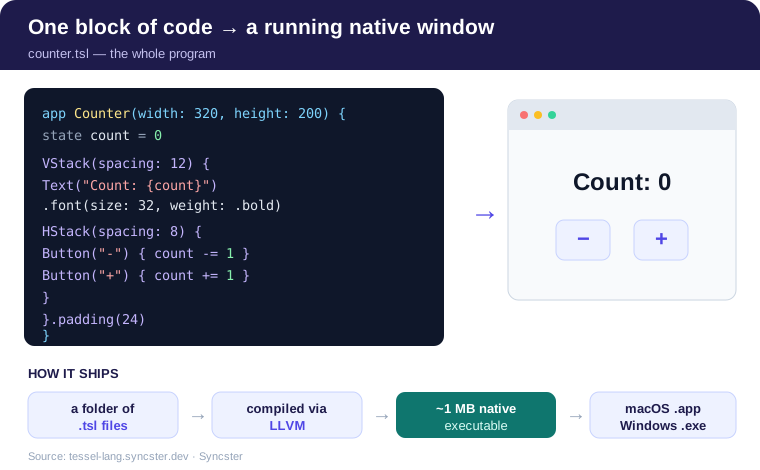
You declare an app with a window size, a piece of state, and a tree of views — VStack, HStack, Text, Button — described the way they should look. Run it with tessel run counter.tsl and a real window opens. There are no project files, no imports, and no build configuration to write. If you've ever bounced off desktop development because of the ceremony involved just to get a window on screen, that absence is the whole point.
Declarative by design
Tessel is declarative: you describe what the screen should show for the current state, and when the state changes, Tessel updates the window for you. You don't manually reach into the UI and mutate a label when the count changes — you change count, and the Text that depends on it re-renders. If that sounds like SwiftUI or React, the mental model is similar, but Tessel folds it into a language small enough to hold in your head.
That smallness is deliberate. Tessel advertises just a handful of rules to learn: one kind of block, value types only, no imports, and errors handled as optionals. And when something does go wrong, the design goal is that every error message tells you what to do next — a philosophy more languages should steal.
Native and genuinely small
Here's the part that surprised me most. Tessel programs don't ship an entire browser engine or a heavy runtime. They compile through LLVM to small native executables — roughly 1 MB for an app — and Tessel draws the UI itself using the system's own graphics. The same source builds a .app bundle on macOS and an .exe on Windows, with no code changes.
A one-megabyte, dependency-free native binary from a dozen readable lines of code is a genuinely different trade-off from the Electron-style status quo, where "hello world" can weigh in at a hundred megabytes.
More than a toy
The counter is the hello-world, but the language reaches further. Out of the box it has structs, enums, lists, and dictionaries; UI building blocks like text fields, toggles, pickers, tabs, and even a code editor; over 100 built-in icons; and access to files, processes, and the network, with callbacks that update your UI safely when work finishes. That's enough to build the kind of small, focused desktop tools that are genuinely tedious to make any other way — there's a todo-list tutorial on the site that walks through a real one.
The IDE is written in Tessel
The most quietly convincing detail: type tessel in a project folder and it opens the Tessel IDE — a file explorer, a tabbed editor with syntax colors and live errors, and one-click run, build, and packaging. And that IDE is itself a Tessel app. A language whose own tooling is written in the language is making a confident claim: this isn't a toy, it's something you can build a real, interactive, stateful application with.
Worth a look
Tessel is a bet that desktop development got too complicated, and that a small declarative language with a tiny native output could win back a lot of the joy. If you want to see it for yourself — the counter above, the todo tutorial, and the IDE — it all lives at tessel-lang.syncster.dev.
Comments
Post a Comment