On February 1, 2012, Facebook filed the S-1 paperwork that would take it public. Buried in the risk factors, past the boilerplate about competition and regulation, sat a sentence that should have terrified anyone paying attention. The company admitted it did "not currently directly generate any meaningful revenue from the use of Facebook mobile products." Its users, meanwhile, were fleeing to their phones by the millions.
Here was the most valuable social network on earth, about to stage one of the largest IPOs in history, quietly confessing that it had no real business on the fastest-growing computing platform of its generation. The desktop web that Facebook had been built on was slowly emptying out. The future was a five-inch screen, and Facebook was barely there.
The Bet That Burned Two Years
The mistake had a name inside the company: HTML5. Rather than build separate, hand-tuned "native" apps for Apple's iOS and Google's Android, Facebook's engineers had bet on a single web-based codebase wrapped in a thin app shell. Write once, run everywhere. On paper it was elegant. In practice it was miserable. The Facebook mobile app of 2011 and early 2012 was a byword for sluggishness — scrolling stuttered, the News Feed crawled, and photos loaded like it was still the dial-up era.
Zuckerberg would later be brutally honest about it. Speaking at TechCrunch Disrupt in San Francisco on September 11, 2012 — with the stock in free fall — he called it plainly: "The biggest mistake we've made as a company is betting on HTML5 over native." The company had, he said, "burned two years" on the approach. It was, in his words, one of the biggest strategic mistakes Facebook had ever made. For a founder famous for never conceding an inch, it was a startling admission delivered in a plain gray T-shirt to a room full of skeptics.
The IPO itself had made the stakes impossible to ignore. Facebook debuted on the Nasdaq on May 18, 2012 at $38 a share, valuing the company at more than $104 billion. Within weeks the stock cratered, sliding all the way to $17.55 by early September. The narrative wrote itself: a bloated, overpriced social network with no answer for the mobile age. The mobile problem wasn't just an engineering headache anymore. It was an existential threat to the company's credibility with the market.
Rip It Out and Start Over
So Zuckerberg did something drastic. He reoriented the entire company around a single word: mobile. Internally, teams were told that features would ship on phones first and desktop second — a reversal of everything Facebook had done for eight years. Product reviews changed. Zuckerberg reportedly refused to look at proposals that led with a desktop mockup. If it wasn't designed for the phone, it wasn't ready.
The clearest proof arrived in August 2012, when Facebook threw out its HTML5 iOS app and shipped a completely rebuilt native version. It was roughly twice as fast. Scrolling was smooth, photos snapped into place, and the app finally felt like it belonged on the device. A rebuilt native Android app followed. The engineering culture that had prized code reuse learned, painfully, to prize the user's experience on each platform above all else.
But faster apps didn't pay the bills. The deeper question was how Facebook would ever make money on a screen too small for the banner ads and sidebar boxes that filled the desktop site. The answer turned out to be hiding in plain sight: the News Feed itself. Instead of bolting ads onto the edges of the screen, Facebook slid them directly into the stream of stories users already scrolled through — "Sponsored" posts that looked and behaved like everything else in the feed. On a phone, where the feed was the entire experience, these ads were unavoidable in the best possible way.
The Fastest Turnaround in Tech
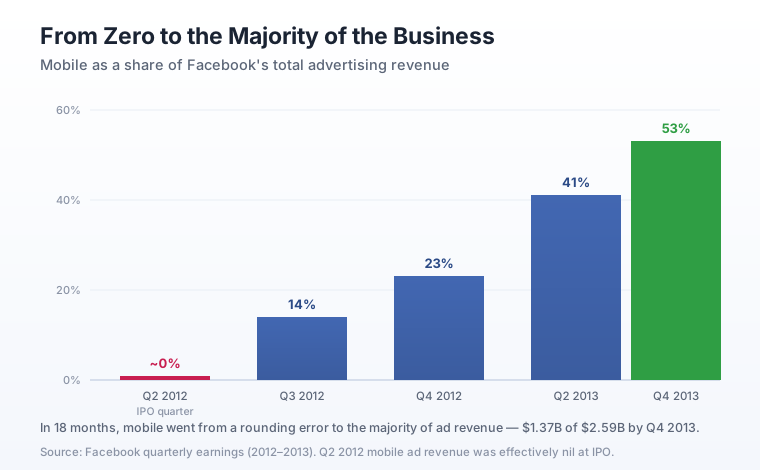
The numbers moved with startling speed. When Facebook first broke out mobile advertising in its Q3 2012 earnings, it accounted for about 14% of ad revenue. By the fourth quarter of 2012 that figure had climbed to 23%, worth roughly $305 million. A year later, in Q4 2013, mobile made up 53% of ad revenue — $1.37 billion out of $2.59 billion — officially the majority of the business. Mobile News Feed ads, which had contributed around 3% of total ad revenue in mid-2012, were carrying close to half of it a year later.
Wall Street noticed. The stock that had bottomed at $17.55 clawed its way back and finally closed above its $38 IPO price in August 2013, a little over a year after the disastrous debut. The company that had confessed it made no meaningful money on phones had, in eighteen months, rebuilt itself into a mobile-first advertising machine. It's one of the sharpest strategic reversals in the history of technology — a $100 billion company turning on a dime because its founder was willing to say, out loud, that he'd been wrong.
The mobile pivot didn't just save Facebook's stock price. It reset the company's ambitions. If the phone was the future, then owning the most important apps on it mattered more than anything. Facebook had already quietly bought a small photo-sharing app called Instagram. Soon it would set its sights on something far bigger — and pay a sum that made even a $1 billion Instagram deal look like a warm-up.
Next in the series: WhatsApp for $19 Billion — the 2014 deal that became the most expensive acquisition in the company's history.
Comments
Post a Comment