On the morning of September 5, 2006, Facebook users logged in expecting the same quiet, page-by-page site they had always used. Instead they got a scrolling river of everything their friends had just done: who added whom, who broke up, who joined a group, who changed a photo. Facebook called it the News Feed. Users called it something closer to a violation. Within hours, the friendliest college site on the internet was in open revolt against the company that ran it.
The feature nobody asked for
Up to that point, Facebook was a collection of profiles you had to go and visit. If you wanted to know what a friend was up to, you clicked to their page and looked. The News Feed flipped that on its head. Now the home screen aggregated your friends' activity automatically, timestamped and ranked, and pushed it in front of you the moment you logged in. A companion feature, the Mini-Feed, did the same thing on each individual profile, logging a running history of that person's recent changes.
Nothing about the underlying information was actually new. Every item in the feed was already visible somewhere on the site — a relationship status, a wall post, a new friend. Facebook's engineers saw the feed as a convenience: instead of hunting through dozens of profiles, the news came to you. But convenience wasn't the problem. The problem was exposure. Information that had technically been public suddenly felt broadcast. Breaking up with someone was one thing; having it announced to hundreds of classmates in a tidy, timestamped headline was another entirely.
Half a million angry students
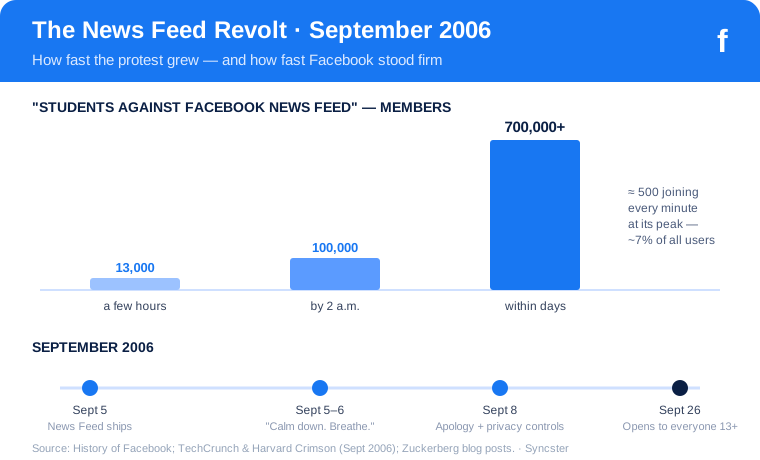
The backlash organized itself with terrifying speed — on Facebook, using Facebook's own tools. A junior at Northwestern University named Ben Parr logged in, recoiled at the new feed, and created a group called "Students Against Facebook News Feed (Official Petition to Facebook)." He told a few friends and walked away from his computer. When he came back a few hours later, the group had roughly 13,000 members. By 2 a.m. it had crossed 100,000. Within days it swelled past 700,000 people — somewhere around seven percent of Facebook's entire user base at the time — with something like 500 new members joining every minute at the peak.
It was, in a strange way, a perfect demonstration of exactly why the News Feed was powerful. The same viral, friend-to-friend mechanics that made people furious were the mechanics spreading the protest. Students threatened boycotts. Reporters at the Harvard Crimson and TechCrunch chronicled the meltdown in real time. The complaint was consistent: the feed was too intrusive, too detailed, too much like surveillance. Facebook, still a company of a few dozen people, had shipped a feature that made a huge chunk of its users feel watched.
Calm down. Breathe.
Facebook's first response was a blog post from Mark Zuckerberg with a title that has since become internet lore: "Calm down. Breathe. We hear you." In it, the 22-year-old CEO argued that no privacy settings had actually changed and that the feed only surfaced things users had already shared. It was technically accurate and completely tone-deaf. Telling hundreds of thousands of upset people to calm down rarely calms anyone down.
The turning point came a few days later, on September 8. Zuckerberg posted a genuine apology — "We really messed this one up," he wrote, admitting the company "did a bad job of explaining what the new features were and an even worse job of giving you control of them." Crucially, the apology came bundled with action: Facebook rolled out a new set of privacy controls that let users decide what showed up in the feed and what stayed off it. The company didn't kill the News Feed. It kept the feature and handed users the dials.
That decision defined the pattern Facebook would repeat for the next decade. Ship something disruptive, absorb the outrage, apologize, add controls — and keep the feature. Because here is the part that still surprises people: the same users who signed the petition kept using the feed, and used the site more. Time on Facebook climbed. The News Feed, so hated in its first week, quietly became the reason people opened the app at all. Within a couple of years it was the single most-viewed surface on the internet, and the foundation on which Facebook would later build its entire advertising empire.
The revolt of September 2006 turned out to be a preview of the company's whole future: a repeated collision between what Facebook could show people and what people were comfortable being shown. And it ended, as those collisions usually would, with Facebook getting its way — just with better controls and a public apology stapled on. Later that same month, on September 26, the company opened registration to anyone thirteen and older with an email address, blowing the doors off the college-only walled garden entirely.
Next time: the gates come down. Facebook opens to the whole world, and a scrappy campus network sets out to swallow the internet.
Comments
Post a Comment