Forebay: How Well Will the Reservoir Serve?

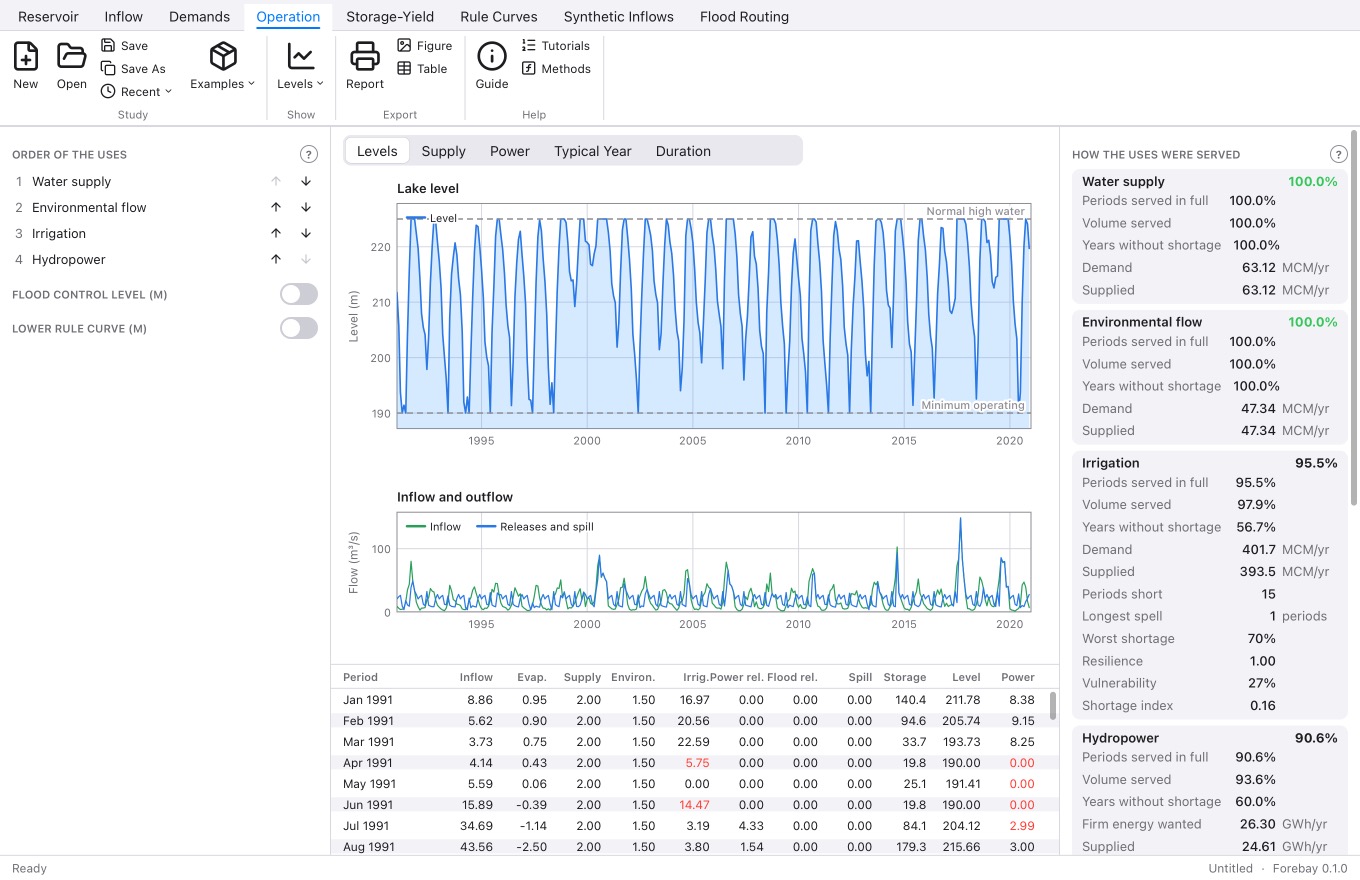
Forebay showing a reservoir operation study with storage over time

A reservoir is a promise: water for a town, for farms, for a power plant, through dry seasons the river alone can't cover. Whether it keeps that promise depends on decades of river flows that nobody can predict. Forebay is a desktop app for reservoir operation studies. You give it a reservoir, a record of the river that fills it and the water people want from it, and it plays the record through, period by period, as if the dam had been running all those years.

One reservoir, four uses, five studies

The operation study works out the lake's water balance each period: inflow, rain, evaporation from the surface it has, seepage, releases and spill, at a monthly, ten-day or daily step. Four uses are served in an order you choose: water supply, environmental flow, irrigation and hydropower. When water is short, the first gets all it wants before the second gets any.

  • Irrigation from the crops: a cropping pattern with land preparation, FAO 56 crop coefficients, paddy percolation and effective rain gives the water to divert.
  • Hydropower from the releases that pass the turbines, under the net head of the day, with a firm power to keep up.
  • Rule curves and rationing: flood control, lower and critical curves, below which each use gets only a share, so the cuts come early and shallow instead of late and deep.
  • A search for rule curves by differential evolution, trying thousands of policies for the least shortage, least worst cut, most energy or most firm power.

Beyond one record

One historical record is only one possible future. Forebay makes synthetic inflow records with the same statistics, by the Thomas-Fiering method for monthly and ten-day flows and by fragments for daily ones, and runs the study over a hundred of them to show how much rested on one record. It also finds the storage a draft needs by the sequent peak method, the firm yield at different reliabilities, and routes floods through the lake over an open or gated spillway.
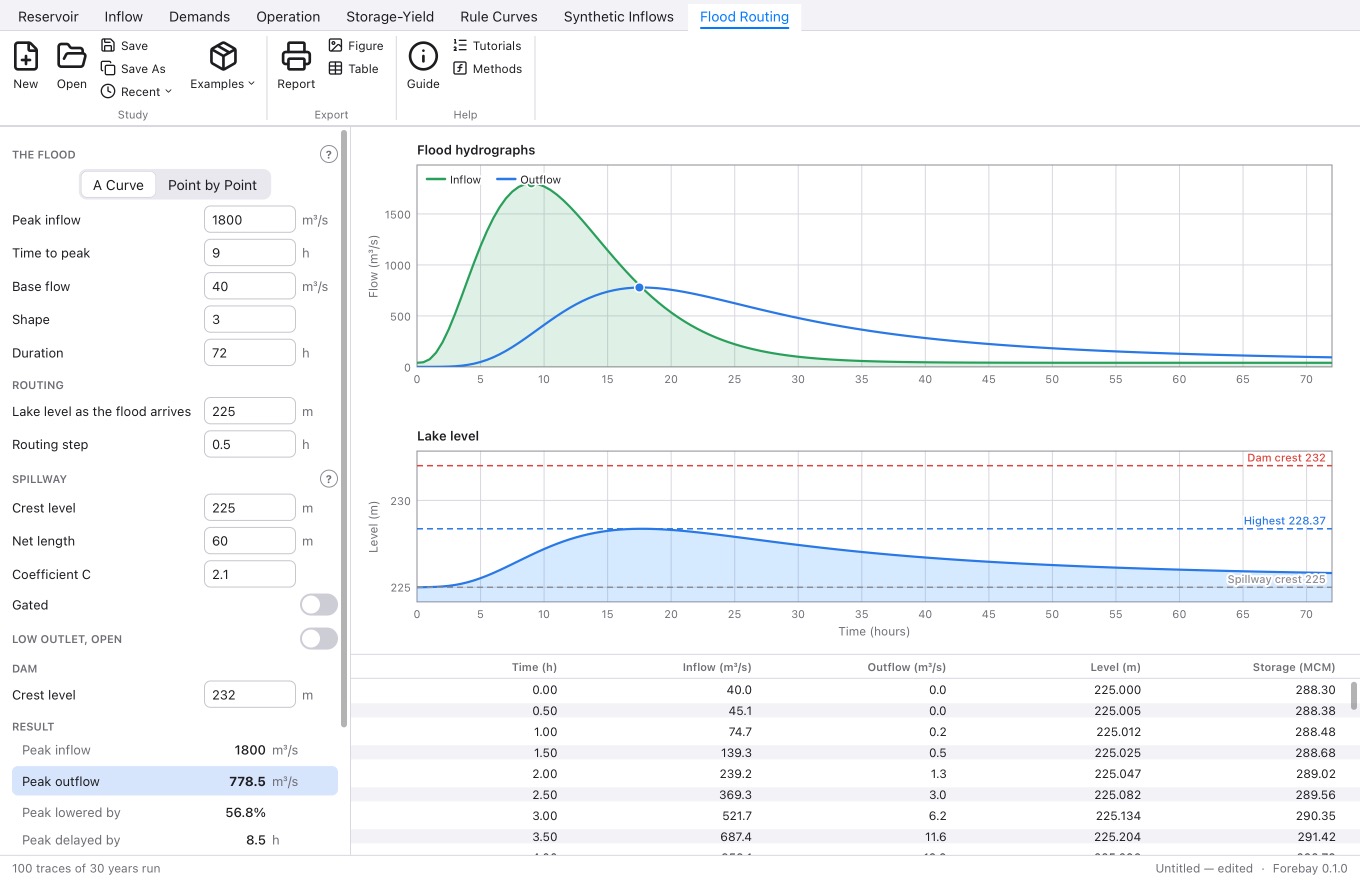
Forebay routing a flood through the reservoir over a spillway

Methods you can check

Every part uses a standard, published method, set out in the app's guide with its equations and sources: Hashimoto, Stedinger and Loucks for performance; FAO 56 for crop water demand; Storn and Price for the rule curve search; Chow, Maidment and Mays for flood routing. Each calculation is checked against hand calculations every time the app is built, and the guide lists plainly what Forebay doesn't do, starting with systems of more than one reservoir.

Get Forebay

Forebay runs on macOS on Apple silicon, with Windows to follow, and comes with example studies ready to run. Download it from forebay.syncster.dev.

Built with Tessel

Forebay is written in Tessel, the small declarative language we made for native desktop apps. The water balance, the optimiser, the synthetic hydrology and every chart in it are Tessel code.


🔗 Explore more from Syncster

Comments

Popular posts from this blog

Cursor AI Review: Is the AI Code Editor Worth It?

I've been using Cursor as my main code editor for a while now, and enough people have asked whether it's worth switching to that a proper review felt overdue. Short version: for me, yes — but with caveats. What is Cursor? Cursor is an AI-first code editor built as a fork of VS Code. That means every extension, theme, and keybinding you already use in VS Code works here, but with AI woven directly into the editing experience instead of bolted on as a plugin. It's made by Anysphere and can run models from OpenAI and Anthropic under the hood. What I like Tab completion is uncanny. Cursor predicts your next edit — not just the rest of the line, but the next change across the file. Once you get used to hitting Tab, going back to a plain editor feels slow. The Composer / Agent mode. You describe a change in plain language and it edits multiple files at once, showing you a diff to accept or reject. For refactors and boilerplate, this saves real time. It unde...

MacBook Pro M5 vs M5 Pro: Which One Should You Actually Buy?

Apple's latest 14-inch MacBook Pro comes in two very different flavors: the base M5 and the step-up M5 Pro . On paper they look similar — same gorgeous Liquid Retina XDR display, same design — but under the hood the gap is bigger than the names suggest. Here's a clear, no-hype breakdown, with concrete use cases so you can match the chip to your work. Quick spec comparison Spec M5 M5 Pro CPU 10-core (4 performance + 6 efficiency) Up to 18-core (6 performance + 12 efficiency) GPU 10-core Up to 20-core Neural Engine 16-core 16-core Memory bandwidth 153 GB/s 307 GB/s (roughly double) Unified memory 16 / 24 / 32 GB 24 / 48 / 64 GB Max storage Up to 4 TB SSD Up to 8 TB SSD Battery (video playback) Up to 24 hours Up to 22 hours Media engines Single encode/ProRes engine More encode/ProRes engines (higher configs) What actually changes between them More cores — the M5 Pro nearly doubles CPU cores and adds GPU cores, so sustained, multi-threaded work finishe...

Running a Server on a Mac Mini: Apple Silicon vs the Home-Server Field

The Mac Mini has quietly become one of the most interesting home-server boxes you can buy. It’s tiny, nearly silent, sips power, and Apple Silicon punches far above its weight. But is it actually the right machine to run your services on — or are you paying an Apple tax for a job a $400 mini PC does better? Let’s put it head-to-head. Why a Mac Mini makes a surprisingly good server Three things make Apple Silicon compelling as an always-on machine: Performance per watt. This is the headline. An M4 Mini idles at just a few watts and rarely pushes past ~35W under load, while delivering multicore performance that embarrasses machines drawing twice the power. Silence. Under typical server loads the fan is inaudible. If your “server” lives in a living room or bedroom, this matters more than any benchmark. Footprint. It’s the size of a coaster and runs cool, so it tucks anywhere. The honest catch It’s not all upside: macOS isn’t...