
By the start of 2001, Apple had stopped dying. The iMac had sold by the millions, the balance sheet was healthy again, and the four-quadrant product grid had given the company a spine. But Steve Jobs wasn't interested in simply being a profitable computer maker. He had a bigger thesis — one he called the “digital hub.” The personal computer, he argued, would become the center of your digital life: the place where your camcorder footage, your photos, and above all your music would live and be organized. The Mac wouldn't just compute. It would curate.
The problem was that in early 2001, the music part of that story barely existed. And the device that would make it famous hadn't been built yet.
A jukebox called iTunes
The software came first. On January 9, 2001, at Macworld in San Francisco, Jobs introduced iTunes — a free application for the Mac that let you rip your CDs into digital files, organize them into playlists, and burn them back onto blank discs. Apple hadn't written it from scratch. The company had quietly acquired a well-regarded Mac MP3 jukebox called SoundJam MP and brought its developers, including engineer Jeff Robbin, in-house to rework it into something simpler and more Apple. The “i” prefix, borrowed from the iMac, signaled that this was a consumer product, not a hobbyist's toolkit.
iTunes solved half the equation: your music was now organized on your Mac. But a hard drive in a beige tower isn't exactly portable. The MP3 players you could actually buy in 2001 were, in Apple's own blunt assessment, either “big and clunky or small and useless.” Flash-memory players held a dozen or so songs. The hard-drive players that held more were heavy bricks with interfaces Apple described as “unbelievably awful.” Nobody had made a music player you'd actually love to carry. That was the opening.
Nine months to a pocket
Jobs handed the hardware problem to Jon Rubinstein, Apple's hardware engineering chief, who had spotted a crucial enabling part: a tiny 1.8-inch Toshiba hard drive that could hold 5 gigabytes in a package small enough to fit in a shirt pocket. Rubinstein recruited Tony Fadell, a contractor with a background in handheld devices, to lead the project. Working with the chip firm PortalPlayer and a famously punishing timeline, the team went from concept to shipping product in roughly nine months.
The breakthroughs weren't only about the drive. FireWire let the device sync an entire music library in minutes rather than the hours USB 1.1 would have demanded. And the now-iconic scroll wheel let you spin through a thousand songs with your thumb instead of jabbing at buttons. The hardware and iTunes were designed to work as one system: plug in the iPod, and it silently mirrored your library. No file management, no fiddling. It just filled up.
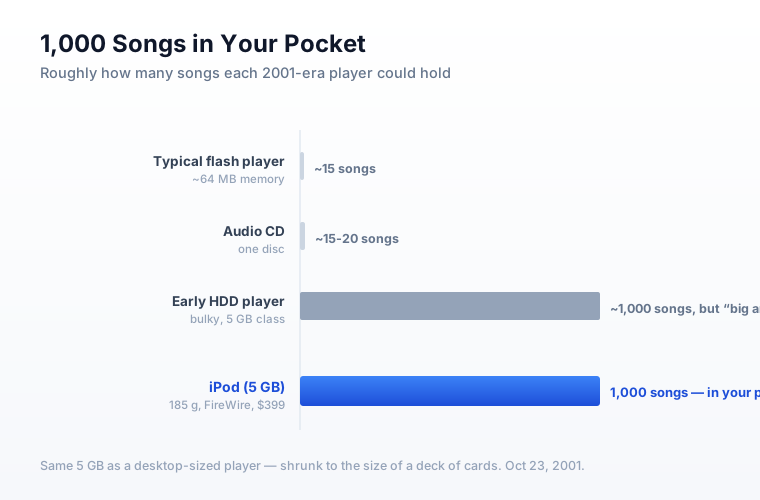
On October 23, 2001 — just weeks after the September 11 attacks, with the tech industry in a nervous crouch — Jobs stood on a small stage and pulled the first iPod from his jeans pocket. Five gigabytes, he said, meant “1,000 songs in your pocket.” It weighed about 185 grams and cost $399. It went on sale on November 10. The reaction was not universal applause: $399 was expensive, and because it required FireWire and iTunes, it worked only with Macs — a tiny slice of the computer market. Skeptics on tech forums joked that iPod stood for “idiots price our devices.”
The flywheel that rewrote the company
They were wrong, but it took a couple of years and two more decisions to prove it. The first was opening the iPod to Windows users — a move Jobs reportedly resisted before relenting, because tying his hottest product to the Mac's small market was leaving the device stranded. The second, and larger, was answering the question iTunes couldn't: where do you legally buy the songs? In an era defined by Napster and rampant piracy, Apple negotiated with the major record labels and, on April 28, 2003, launched the iTunes Music Store — a catalog of songs you could buy individually for 99 cents each, with no subscription and no strings. It sold over a million songs in its first week.
That was the flywheel. iTunes organized your music; the Store sold you more of it; the iPod carried it everywhere; and every step pulled you deeper into Apple's ecosystem. The device that pessimists had written off became a cultural object — the white earbuds turned into a visual shorthand for the whole decade. Over its lifetime, Apple would sell roughly 450 million iPods, and for several years the little music player, not the Mac, was the engine of the company's growth.
More than the revenue, the iPod changed what Apple believed it was. The company had just proven it could design a world-beating consumer electronics device, build the software to run it, and run the service that fed it — all stitched into one seamless experience. That template — hardware, software, and service as a single product — was the exact playbook Apple would soon point at a far bigger target.
Next time: Apple drops the word “Computer” from its name — and bets everything on a phone.
Comments
Post a Comment